How bddr works
bddr does three things nothing else does. This page explains how each one works — architecturally, operationally, and for your data.
See what matters: how bddr classifies your targets

bddr.ai is a Chrome browser extension that helps Amazon advertisers optimize their Sponsored Products campaigns. It adds visual overlays, performance insights, and bid management tools directly on top of the Amazon Advertising Console — the same interface you already use every day.
bddr.ai adds visual overlays to help you interpret your advertising data at a glance:
- Heatmaps — color-coded backgrounds on your table cells showing performance tiers
- Health badges — indicators showing which keywords need attention and why
- Conversion rate annotations — calculated metrics overlaid on your targeting pages
- Duplicate detection — badges showing keywords that appear across multiple campaigns
- Edit recency markers — dots showing how recently each target was last changed
- Side panel — a dedicated panel with your campaign overview, bid suggestions, and optimization tools
These overlays are purely visual and informational. They don't change any of your campaign settings.
Technical details
Real-time intelligence
On top of health classification, bddr runs three live signals on every page:
- Anomaly detection — z-score for real-time peer comparison; CUSUM for historical trend shifts once enough data has accumulated.
- Spend forecasting — projects monthly spend using simple exponential smoothing, Holt's linear trend, and Holt-Winters seasonal models, picking the best fit for your data.
- Performance trends — 14- to 30-day sparklines on grid pages show ACoS, spend, and sales trajectory at a glance.
All three run client-side; the underlying observations live in your browser's IndexedDB.
Act where you are: how bddr lives inside the Console

When you choose to apply bid changes through bddr.ai, the process is always under your control:
- You initiate. Every optimization starts with your action — clicking a button, selecting targets, choosing a strategy.
- You review. Before anything changes, bddr.ai shows you a complete preview: every target, current bid, proposed bid, and the reasoning behind it.
- You confirm. Changes are only applied after you explicitly approve them. There is no automatic execution.
- You can undo. After changes are applied, you can undo them with one click.
For larger batches, bddr.ai generates an Amazon-compatible bulk operations spreadsheet (.xlsx) that you upload through Amazon's own Bulk Operations interface. This is the recommended method for applying many changes at once — it uses Amazon's own upload mechanism and gives you a complete record of every change in a single file.
bddr.ai requests only the permissions it needs:
- Host access — Limited to Amazon Advertising domains (advertising.amazon.com and regional variants), our API (api.bddr.ai), and our payment provider (api.lemonsqueezy.com)
- Storage — To save your settings and cached data locally
- Active tab — To detect which Amazon page you're on
- Side panel — To display the optimization panel
- Downloads — To generate bulk operation spreadsheets
bddr.ai does not request access to your browsing history, cookies, or any non-Amazon websites.
…and you never leave the keyboard. See the full keyboard reference — ⌘K command palette plus vim-style navigation chords.
bddr.ai is an independent product built by Fazr. It is not affiliated with, endorsed by, or sponsored by Amazon.com, Inc. or any of its subsidiaries. Amazon, Amazon Advertising, and Sponsored Products are trademarks of Amazon.com, Inc.
Understand every change: how bddr keeps you in control
bddr.ai is a user-assistance tool. It helps you see your data more clearly and act on it more efficiently. It does not operate autonomously, run on a schedule, or make changes without your explicit approval.
Every change is logged in your local audit trail with before and after values, so you always have a complete record of what was changed, when, and why.
bddr.ai includes multiple layers of protection to prevent unintended changes:
- Cooldown periods — prevents the same target from being changed too frequently (default: 7 days between changes)
- Change caps — limits how much any single bid can change in one adjustment (+20% / -25% max)
- Whipsaw prevention — extended cooldown for opposite-direction changes to prevent oscillation
- Batch limits — caps the number of changes per session
- Full audit trail — every change recorded with before/after values
- One-click undo — revert recent changes instantly
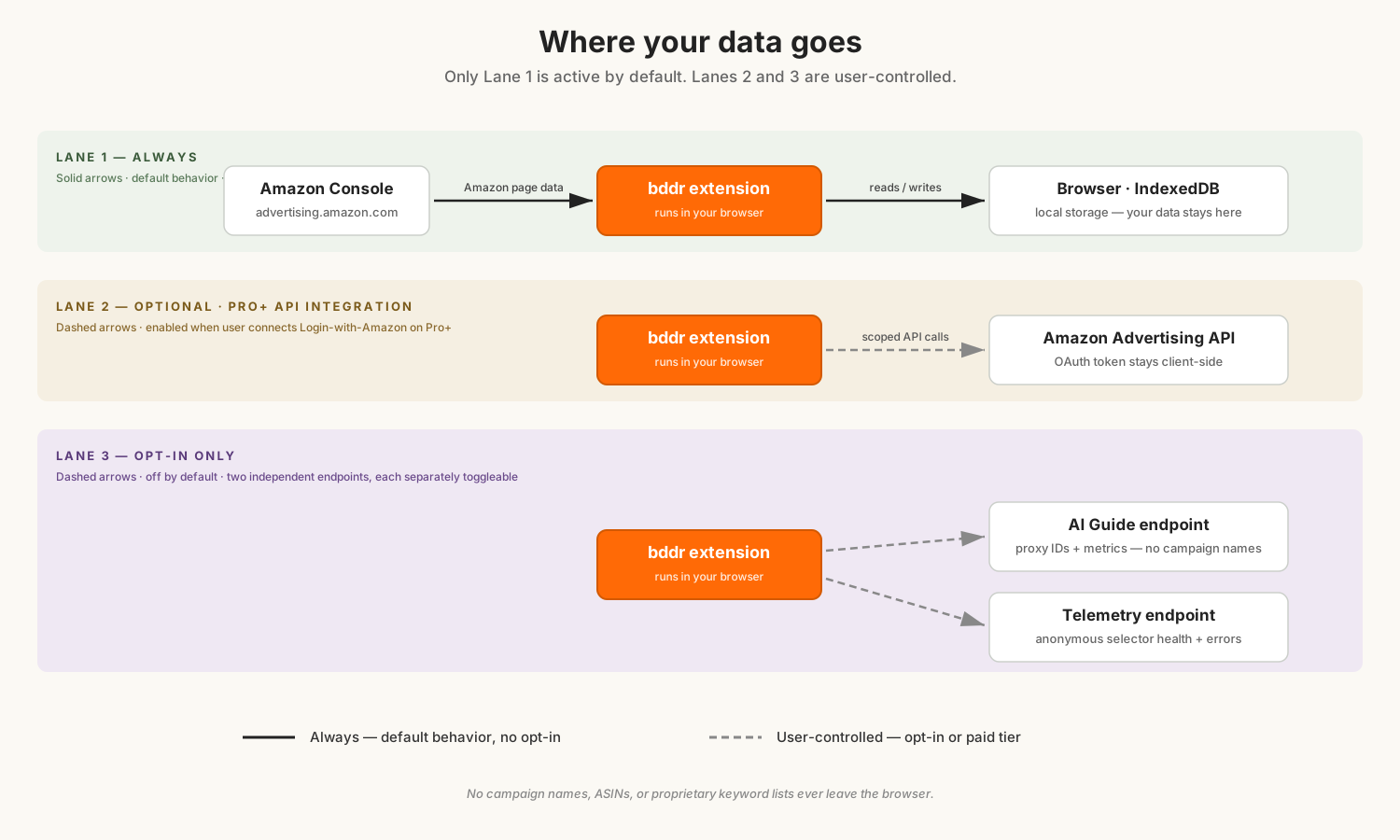
By default, your advertising data stays in your browser. When you visit the Amazon Advertising Console with bddr.ai installed, the extension reads the data that's already displayed on your screen — the same campaigns, keywords, bids, and metrics you see in your tables. It uses this data locally to compute insights like health scores, heatmaps, and bid suggestions.
All of this data is stored on your device using Chrome's built-in storage and is never transmitted to our servers, any third party, or anywhere outside your browser.
- Campaign names, keywords, bids, spend, and sales — stored locally only
- Performance history and analytics — stored locally only
- Audit trail of changes — stored locally only
- Bid suggestions and health scores — computed locally, stored locally
Pro+ users will be able to opt in to API integration once it ships. They will authenticate via Login with Amazon OAuth; tokens will be stored in the browser and refreshed via our proxy every 50 minutes — we will never persist them on our servers. No campaign data, keywords, or spend will be sent to our servers through the API integration.
bddr.ai communicates with external services — none of which receive your advertising data. Our backend at api.bddr.ai handles:
- Anonymous telemetry (opt-in) — If you choose to enable it during setup, bddr.ai sends anonymous usage statistics to help us detect issues and improve the product. This includes things like whether page elements loaded correctly, how many optimizations were performed (counts only), and error reports. It never includes campaign names, keywords, bids, spend, sales, or your Amazon account ID. Events are retained for 90 days. You can disable this anytime in Settings.
- Remote config — Feature flags, maintenance mode, minimum version requirements, and announcements. No advertising data is included.
- OAuth token refresh proxy (future Pro+ API integration only) — once API integration ships, our backend will proxy OAuth token refreshes so Amazon tokens stay current. We will never store or log your tokens — they will live exclusively in your browser's local storage.
- AI Guide request proxy (Pro+ beta) — AI Guide sends anonymized numeric metrics only (no campaign names, keywords, or IDs) through our backend to a language model. Payloads are not persisted on our servers.
- License validation (LemonSqueezy) — If you have a paid subscription, your license key is verified with our payment provider. Only the license key is transmitted. No advertising data.
For full details, see our Privacy Policy.
bddr.ai does not ask for, store, or transmit your Amazon login credentials. It works within your existing authenticated browser session — the same session you use to access the Amazon Advertising Console directly. If you log out of Amazon, bddr.ai has no access to anything.
bddr.ai is a tool that operates on your behalf within the Amazon Advertising Console. You are responsible for reviewing all changes before confirming them and for ensuring that your use of the extension aligns with any applicable terms of service. We strongly recommend reviewing bid suggestions carefully and using the preview feature before applying any changes to your campaigns.
If you have questions about how bddr.ai works, our data practices, or anything else, reach out at support@bddr.ai.
See what matters. Act where you are. Understand every change. That's bddr.